Marcel Yuwono 31 July 2020
Motivation
I was reading through some machine learning articles and came across DAIN. DAIN stands for Depth-Aware Video Frame Interpolation. Frame interpolation is a machine learning method to increase FPS in videos, creating a smoother result. A few researchers from Shanghai Jian Tong University frame interpolation method that seemed to perform better than current models. I decided to test it out.
Frame Interpolation
The idea behind frame interpolation is quite simple. First, we separate a video into its component frames. Next, we take 2 adjacent frames and generate a new in-between frame using the information from the two frames. We repeat this process for every adjacent frames, and the result is a video with effectively double the number of frames. Played at the same duration, this doubles the FPS. If we want, we can repeat the process to keep doubling the FPS of the video.
To illustrate, imagine a 2-frame video of a ball rolling down a slope. The first frame is the ball on the top of the slope, and the second frame is the ball at the bottom of the slope. When we run frame interpolation, the two frames are read, and a new frame is constructed (in between the 2 original frames) of the ball in the middle of the slope.
The neural network recognizes that there is an object moving between two frames, and uses that information to infer where the object may be between the timeframe. If we repeat this process, we can populate more frames of the ball on different heights on the slope. Finally, we collate all the frames into a new video, which will have smoother animation.
DAIN
DAIN works by analyzing the features and characteristics of the two input frames and creating intermediate layers and flows. Most notably, it creates a depth map from the source frames that detects which objects are closer and more important and uses that information to interpolate the new frame.
Here's what the process looks like:
Click the image to open in a new tab.
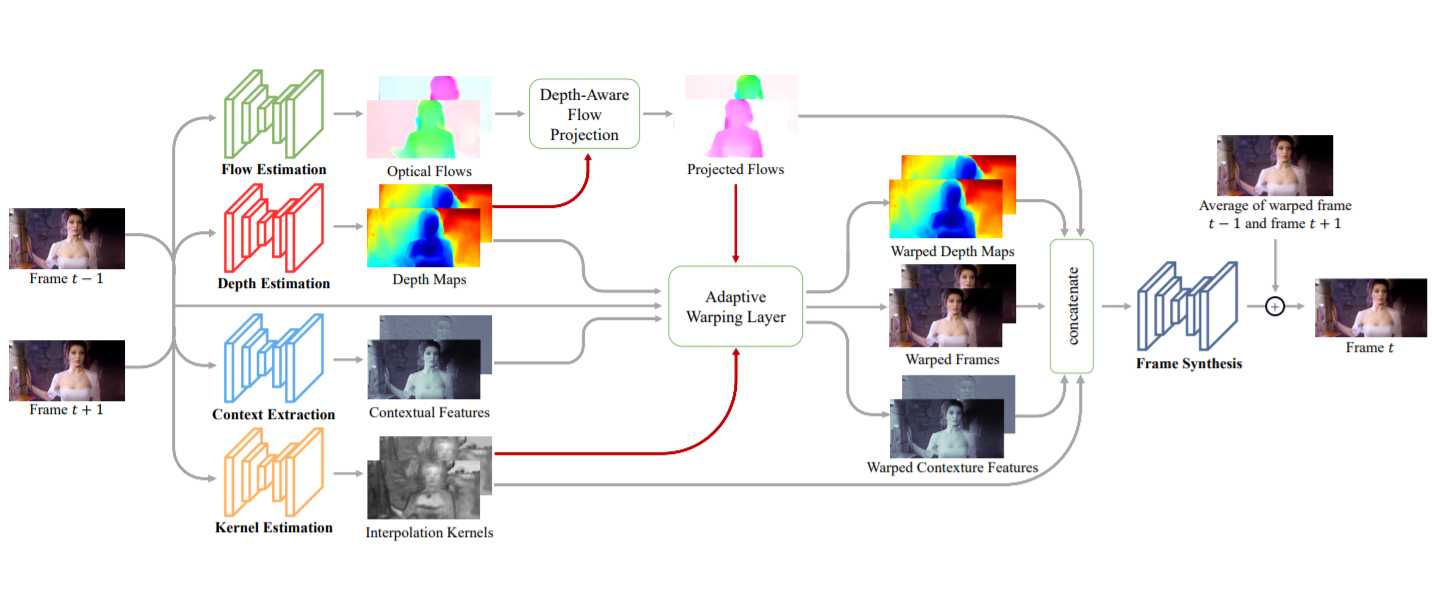
This image is taken directly from their paper, which explains the process in greater detail. You can access the paper here.
Colorization
I used DeOldify and their pre-trained video model to colorize the videos. DeOldify's model is trained on old images, which is suitable for our use.
Results
Here's the sample video I used, courtesy of guy jones on YouTube:
I colorized the video first since interpolating first would mean I would have to colorize double the number of frames. Both colorizing and interpolating is quite GPU intensive. On my laptop with a dedicated GPU, colorizing the 58-second video of 1733 frames took around 30 minutes and the interpolation took around 2.5 hours.
Here's the result of the colorization:
Next, we run DAIN to make the video smoother. The source file is 30 FPS, so we do a 2x interpolation to get 60 FPS.
Next, I ran the colorization + interpolation on a different video, a Charlie Chaplin clip:
This time, I trimmed the video to around 20 seconds so I could interpolate faster. The source video is 25 FPS, then 2x interpolated to yield 50 FPS. The original video is of a higher quality than the train video, and the results are more impressive:
Final Thoughts
DAIN worked incredibly well with the two videos I tested. Even today, many content and movies these days still run on 30 FPS, DAIN can enchance our viewing experience with these videos. Frame interpolation is a very intensive task, but in the near future, maybe we will have TVs that can interpolate videos in real-time and we can watch movies with hundreds of FPS.
I tried upscaling the video with ESRGAN to achieve better resolution but the results had minimal impact when operated on select frames. It would've taken another few hours to process the videos with ESRGAN so I decided to forgo the process entirely.
Next Steps
The colorization worked quite quickly but the colors weren't as vibrant as I had wanted. I intend to try other colorization models to find ones that give more colorful results.
References
- Bao, Wenbo et al. "Depth-Aware Video Frame Interpolation." IEEE Conference on Computer Vision and Pattern Recognition. 2019. Link.
- "1897 - Arrival of a Two-Stage Train in France (speed corrected w/ added sound)." Youtube, uploaded by guy jones, Jul 9 2017. Link.
- "Charlie Chaplin - Modern Times - Roller Skating Scene." Youtube, uploaded by Charlie Chaplin, Oct 4 2016. Link.